Closing the Till
Closing the till represents the end-of-day process that finalizes cash and card amounts for accurate reporting and reconciliation.
Steps to Close the Till
1. Access the Close Till Menu
From the main menu, navigate to Close Till to begin the end-of-day closure process.

2. Enter Cash and Card Amounts
In the Close Till screen, input the total cash and card amounts collected during the day.
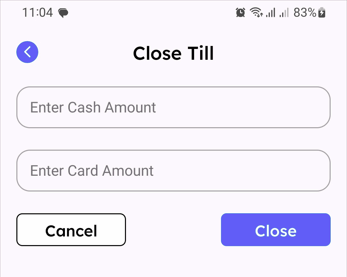
3. Confirm and Close
Tap Close to finalize till closure. The system automatically prints a receipt summarizing the day's totals.
Importance of Till Closure
End-of-day till closure creates a final record of daily sales and ensures all transactions are properly documented. This process is critical for cash reconciliation and daily bookkeeping operations.
Tips for Accurate Till Closure
- Double-Check Totals: Count both cash and card amounts carefully before entering them to prevent discrepancies.
- Record Any Differences: Note any variance between till total and actual cash in daily records for transparency.
- Print and Store Receipts: Keep physical copies of till closure receipts as backup documentation for audits.
- Verify Card Transactions: Confirm all card transactions are processed and reflected in daily totals before closing.
- Avoid Last-Minute Adjustments: Complete any till adjustments prior to initiating the close till process to prevent final tally errors.