Manual Synchronization with Back Office
The Get Update feature in Posterita POS allows users to perform a manual synchronization with the back office at any time. While the POS automatically syncs during opening and closing, this feature gives users flexibility to ensure they have the latest updates throughout the day. It allows you to manually refresh data such as items, prices, customers, users, and orders, keeping your POS current with back-office adjustments.
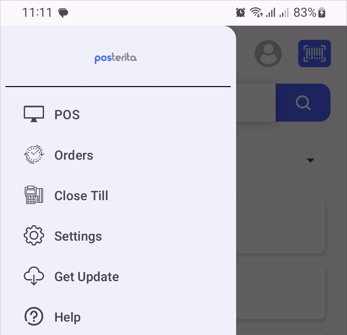
1. Access Get Update
- From the main menu, tap Get Update to start the manual sync process.
2. Synchronization in Progress
- The POS will begin updating its data, including any recent changes to items, prices, customers, users, orders, and other settings.
3. Completion of Manual Sync
- Once the process is complete, your POS system will display the latest data from the back office.
Why Use Manual Synchronization
Although automatic syncing occurs during opening and closing, a manual sync can be helpful when immediate updates are made in the back office, such as price changes or new items that need to be available immediately in the POS.
Tips
- Use After Key Changes: If updates like price changes or new items are added in the back office during the day, use Get Update to ensure your POS reflects these changes promptly.
- Check Connection: Ensure a stable internet connection for a smooth synchronization.
- Verify Critical Updates: After syncing, double-check any critical data, such as prices or item availability, to ensure accuracy.
This feature provides flexibility, allowing you to refresh the POS system manually and maintain real-time accuracy across your sales operations.