Setting Up Your Business Information on Posterita POS
Configuring your business information is crucial for ensuring smooth operations within the Posterita POS system. This information will be used throughout the platform, from generating receipts to managing customer communications.
Quick Setup Steps
- Access the Account Menu: Once logged in, navigate to the Account Menu in the top navigation bar.
- Enter Your Business Information: Fill in fields like Business Name, Address, Phone Number, Email, and Business Registration Number.
- Save Your Information: Click "Save" after reviewing all details.
Detailed Walkthrough
1. Access the Account Menu
Once logged in to Posterita POS Back Office, navigate to the Account Menu located in the top navigation bar.
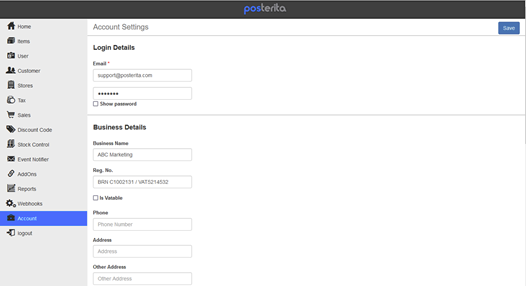
[Screenshot: Account Menu location in top navigation]
2. Enter Your Business Information
Fill in the required fields, including:
- Business Name
- Business Address
- Phone Number
- Email Address
- Business Registration Number
3. Save Your Business Information
After reviewing the details, click the Save button to store the information.

[Screenshot: Save button]
Important Tips
- Double-Check Accuracy: Ensure all information is correct, as it will be used for official purposes such as receipts and business communications.
- Update When Needed: You can always return to the Account Menu to update details if your business information changes. Keeping this data current is crucial for smooth day-to-day operations.