Adding New Customers
Easily create customer profiles in Posterita to track customer information and streamline transactions. By default, the POS assigns sales to a 'walk-in customer'; however, at the POS stage, your employee can assign the sale to a specific customer profile. By doing so, any preferential pricing or discount codes linked to that customer are automatically applied. Capturing detailed customer data allows you to leverage pattern understanding to better predict customer needs, personalize communication, and improve service. This helps build loyalty, reach customers with targeted promotions, and drive repeat sales.
Steps
1. Access the Customer Menu
In the Posterita POS Back Office, navigate to the Customer Menu.
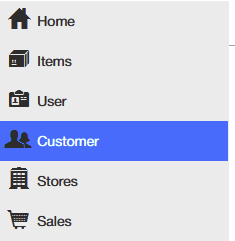
2. Create a New Customer
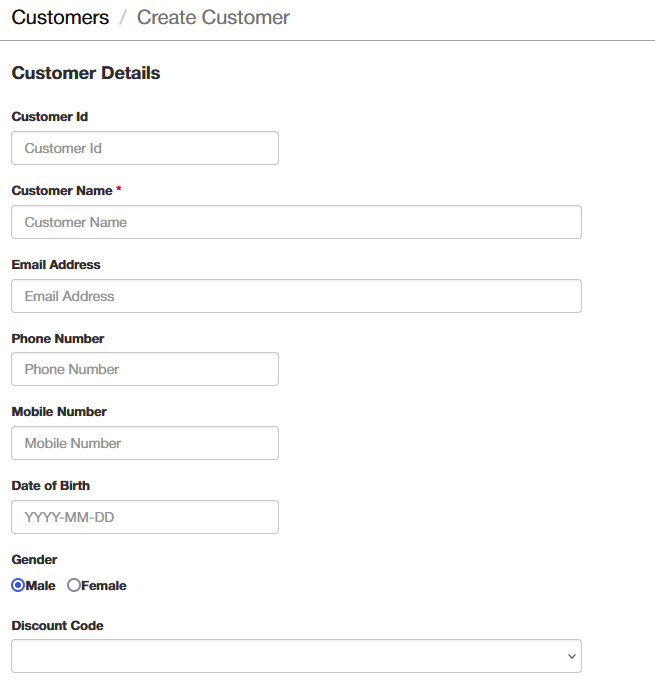
Click the add button to create a new customer profile.

The required information includes:
- Customer Name and Phone Number (for identification and communication)
Additional optional details can also be entered, such as:
- Customer ID, Email Address, Date of Birth, Gender (useful for personalizing customer engagement)
- Discount Code: A predefined discount assigned to the customer, which acts as a preferential rate for everything they buy
- Discount Code Expiry Date: Defines when the discount code will expire and be reset
- Reg No. & VAT No.: Registration number and VAT number for corporate customers
- Notes: Any relevant notes that might help better serve the customer
3. Save the Customer
After entering the necessary details, click Save to create the customer profile.
Important Tips
- Keep Customer Profiles Updated: Keeping customer profiles up to date ensures that you can track customer sales history and manage follow-up services effectively.
- POS and Back Office Synchronization: Customer profiles created at the POS will automatically sync with the Back Office, centralizing all data.
- Impact on Audit Trail and Fraud Prevention: For audit purposes, only customers without transactions should be deleted. Removing customers with transaction history compromises audit integrity.
- Fraud Prevention Considerations: Ensure that discount codes and other benefits are assigned correctly to prevent unauthorized use or manipulation.