Deleting or Deactivating Customers
Manage your customer list by either deleting or deactivating customer profiles that are no longer active. Only customers who have not purchased anything can be deleted, as deleting a customer involved in any transaction would compromise the integrity of records and audit trails. Deactivating allows you to keep the customer's information without including them in active lists, which is useful if you think the customer might return in the future or for maintaining audit records.
Steps
1. Access the Customer Menu
In the Posterita POS Back Office, navigate to the Customer Menu.
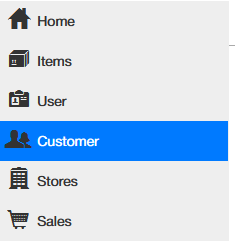
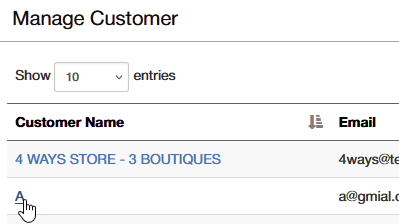
2. Select the Customer
Find the customer you want to remove or deactivate and click on their name to open the customer details.
3. Deactivate a Customer
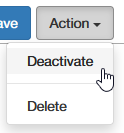
To deactivate the customer:
- Click the Action button in the top right corner of the customer details page.
- Select Deactivate to remove the customer from active lists while retaining their information for future reference. This is particularly important for maintaining audit trails and ensuring historical transactions remain accessible.
4. Delete a Customer
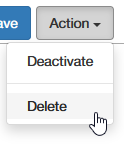
If the customer is not assigned to any order, you can delete them:
- Click the Action button in the top right corner of the page.
- Select Delete and confirm the deletion to permanently remove the customer profile.
- If the customer is assigned to an order, deletion is not allowed, but you can deactivate the customer instead.
Important Tips
- Deactivating vs. Deleting: Deactivating a customer is useful when you want to keep the profile for potential future use or historical reference. Deactivated customers remain part of the system and can be reactivated if needed. Deleting is permanent and only possible if the customer has no linked transactions.
- Audit Trail Considerations: For audit trail purposes, deactivating a customer helps retain all historical records of their interactions, such as orders and discounts used. Deletion is only recommended when no transactions are involved to maintain data integrity.
- Fraud Prevention: Properly managing customer profile status helps prevent unauthorized access or misuse. Regularly review customer profiles to ensure that only active and relevant profiles are retained in active customer lists.