Allowing/Enabling Credit to a Customer
Posterita enables businesses to extend credit to customers, facilitating purchases without immediate payment. This capability proves especially valuable for distribution, wholesale operations, and mobile sales teams, as it supports customer retention while maintaining accurate balance tracking.
Tips for Allowing/Enabling Credit
Enable credit for customers to allow them to make purchases on credit and track their credit limits and balances in the Back Office.
1. Access the Customer Menu
In the Posterita POS Back Office, navigate to the Customer Menu and select the customer for whom you want to enable credit.
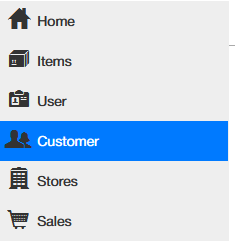
[Screenshot: Customer Menu interface in Back Office]
2. Enable Credit
In the customer's profile, locate the option to enable credit for the customer. This allows the customer to make purchases on credit.
 "At the sales stage, when the sale is assigned to a customer, there is an option to choose whether the sale is on cash, card, or credit." Posterita will check if the customer has sufficient available credit balance before processing the sale.
[Screenshot: Credit enablement option in customer profile]
3. Set Credit Limit
Assign or adjust the customer's Credit Limit, which defines the maximum amount of credit they can use. Ensure this limit is appropriate based on the customer's payment history to avoid excessive credit.
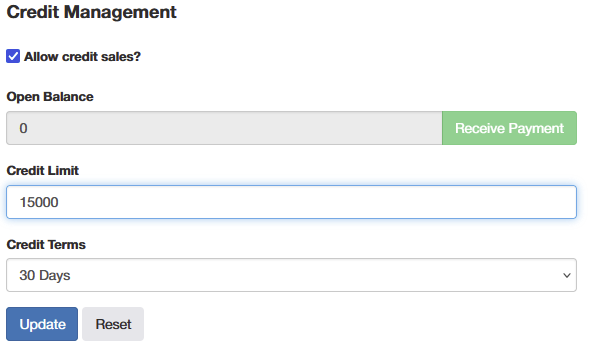
[Screenshot: Credit limit assignment interface]
4. Save Changes
Once the credit limit is set, click Save to apply the changes to the customer's profile.
Important Tips
- Credit Limit Management: Setting appropriate credit limits helps prevent customers from accumulating too much debt, minimizing the risk of unpaid balances. Review credit limits regularly to ensure they match the customer's payment behavior.
- Trusted Customers Only: "Only enable credit for trusted customers to minimize the risk of overdue payments." A well-maintained credit policy can support strong customer relationships while ensuring business sustainability.
- Audit Trail and Record Integrity: Allowing credit impacts both sales records and outstanding balances, making it essential for audit trails. "Deleting a customer who has been given credit is not allowed, as it would compromise financial integrity." Instead, deactivating a customer ensures their credit history and outstanding balances remain intact for future reference.