Posterita Mail OS · Built for SME finance teams
Stop scrolling Gmail for last quarter's invoices.
Mail OS connects to your Gmail, Outlook, or IMAP mailbox, pulls attachments out of the thread, classifies them with AI, and turns your inbox into a searchable asset register. Invoices, supplier statements, customer KYC, regulatory letters — extracted, deduplicated, and linked to the company that sent them. Live at mail.posterita.com.
Live today · Self-serve onboarding
Connect once. Indexed forever.
Mail OS speaks Gmail, Microsoft 365 / Outlook, and standard IMAP. The connection is read-only and scoped to attachments and the metadata around them — sender, recipient, subject, date, message ID. Nothing in your inbox moves; nothing gets deleted. Mail OS just reads, copies the attachment into its own encrypted store, and keeps the source .eml alongside it.
You decide the scan window per mailbox — last 90 days, last year, or every message since you opened the account. The raw .eml provenance archive stays untouched so when a classifier improves we can re-process old documents without going back to the mailbox. One connection, indexed forever.
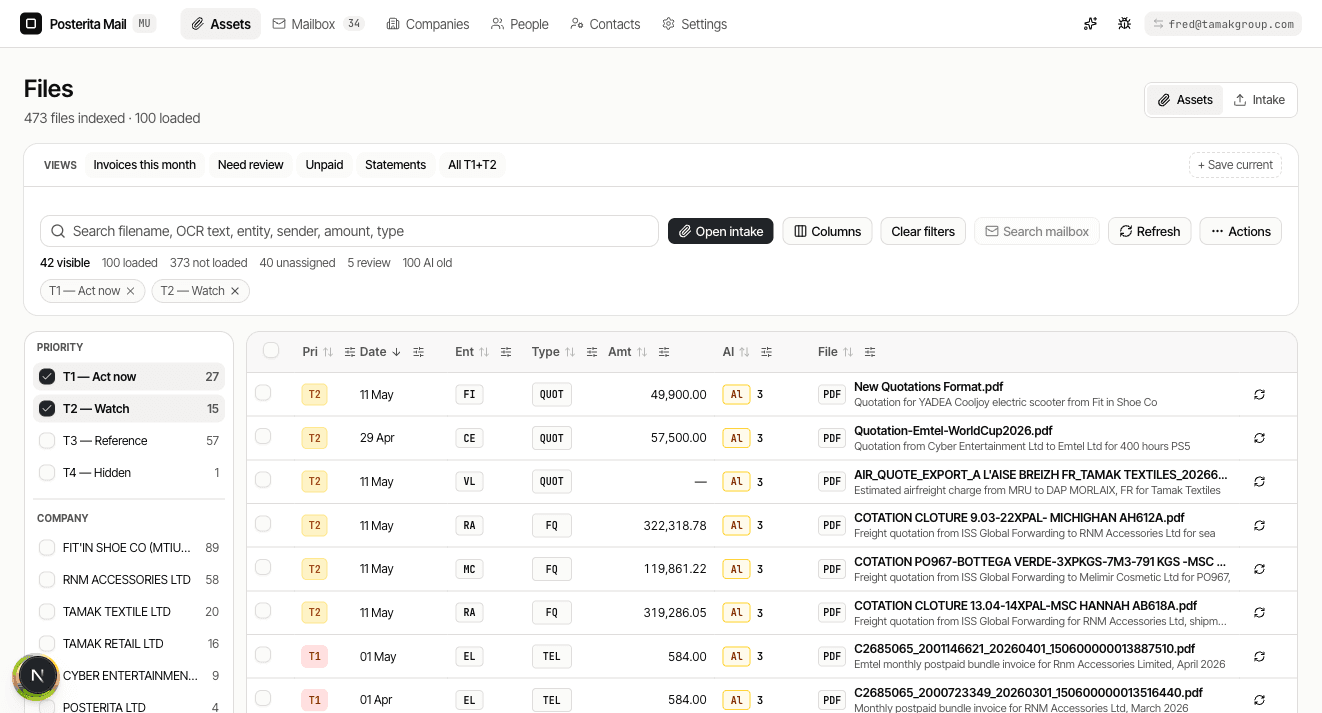
Three kinds of paper, one register.
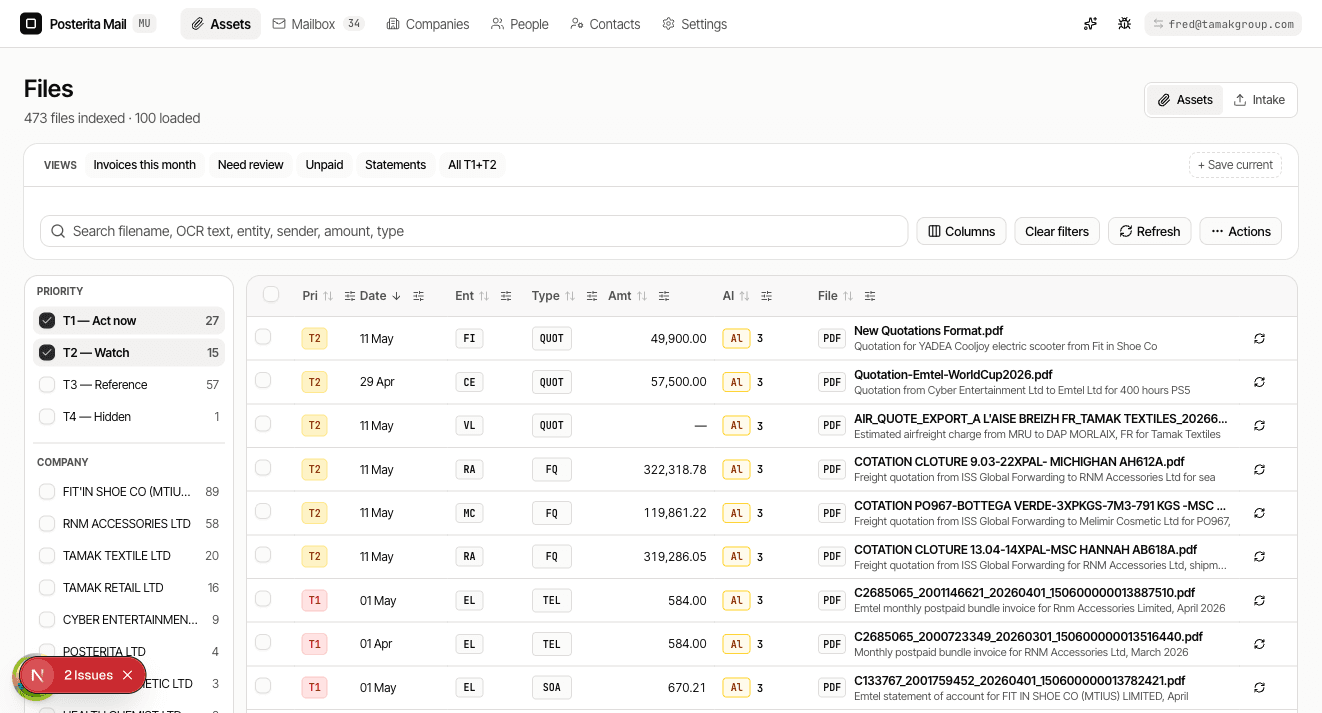
Most of what a small finance team receives by email falls into a handful of categories: supplier invoices, bank and statement PDFs, KYC documents from customers (NIC, passport, proof of address), regulatory letters, signed contracts, and the occasional credit note. Mail OS recognises each shape, tags it, and puts it in the register against the company that sent it.
What emerges is a single asset vault — searchable by company, by document type, by date, by counterparty. A bookkeeper looking for the May statement from MCB types the supplier name and the month; the document is there. An ops manager who needs every invoice from a given supplier across the year filters by company and gets the lot. The mailbox stops being the filing cabinet. The register is the filing cabinet, and the mailbox is just one of its sources.
Classified by AI. Verified by humans.
The classifier is DeepSeek with an OCR fallback for scanned PDFs and images. It reads the document, decides what kind of paper it is, extracts the counterparties, and writes the result into the register tagged with its source. The label is never silent — every document shows which classifier ran, and a human on your team can override the label, the company link, or the extracted fields in one click.
The honest framing: AI handles the volume so your team handles the edges. The classifier is right on most invoices and most statements; it asks for help on the awkward ones. Overrides are captured in an append-only audit log so you can see who corrected what, when. Nothing pretends to be more confident than it is.
Counterparties without spreadsheets.
Every attachment has people and companies on it — a supplier name on an invoice, a bank on a statement, a director on a KYC form. Mail OS extracts them, deduplicates them across documents, and links each one back to a company record in your asset register. The same supplier emailing from three different addresses lands against one entry. The spreadsheet of suppliers you keep in parallel — the one no-one updates — stops being necessary.
One copy of each attachment.
The same PDF emailed across five threads, forwarded to three colleagues, and re-sent by the supplier next month lands once in the asset register. Mail OS deduplicates by content hash, not by filename, so a renamed copy still gets caught. Every email that carried the file is preserved untouched in the .eml provenance archive — the forensic trail stays complete; the canonical attachment lives once.
A controlled bridge into Legal OS.
If you also run Posterita Legal OS for your statutory work, Mail OS forwards the documents that belong in the Mauritius legal system into Legal OS automatically. The bridge is one-way: Mail OS filters and classifies; Legal OS receives. Only files under 25MB that pass the Mauritius-relevance check make the trip. Everything else stays in Mail OS, available but not promoted.
The boundary is a feature, not a limitation. Mail OS is allowed to touch non-Mauritius infrastructure — Gmail servers, global object storage, third-party classifiers — because it is the intake layer. Legal OS stays clean. Documents the team needs for filings show up in Legal OS without an upload step; documents that do not belong there never arrive.
Three steps. No implementation project.
- Connect your first mailbox. OAuth for Gmail or Outlook; user / password / host for IMAP. About a minute, including the consent screen.
- Pick the scan window. Last 90 days for a quick start, last year for a real one, or everything since the account opened. Mail OS pulls in the background.
- Tag the first ten documents by hand. The classifier picks up your terminology — what you call a statement vs. a remittance, which supplier names map to which company. After ten, it gets quiet.
Total time: under 30 minutes from sign-up to a working register. No consultant, no multi-week rollout, no document-management implementation project. The Dext / Hubdoc school of onboarding does not apply here.
Questions people actually ask.
Does Mail OS read all my emails?
No. Mail OS asks for the minimum scope each provider exposes — read-only access to attachments and the metadata around them (sender, recipient, subject, date, message ID). It does not read the email body for content unless an attachment-classifier needs the surrounding text to disambiguate. You can revoke the connection at any time from your Google, Microsoft, or IMAP provider, or from Mail OS itself.
What about data sovereignty for Mauritius businesses?
Mail OS runs on Supabase (Postgres + Auth) and shares R2 object storage with Legal OS. R2 is Cloudflare's S3-compatible store and is not Mauritius-resident — it is global. If your engagement requires in-jurisdiction storage, you should be on Legal OS directly for the regulated workload; Mail OS is positioned as the inbox-facing intake layer that may legitimately touch non-Mauritius infrastructure. We say so plainly in our DPA. The Mauritius-resident pieces live in Legal OS.
Will Mail OS delete attachments from my inbox?
No. The mailbox connection is read-only. Mail OS does not move, modify, or delete anything in Gmail, Outlook, or your IMAP server. It pulls a copy of the attachment plus the .eml of the source email into its own encrypted store. Your inbox stays exactly as it was. If you disconnect Mail OS, the inbox is untouched.
Can I disconnect a mailbox?
Yes, instantly. Disconnecting revokes the OAuth grant (Gmail / Outlook) or removes the stored IMAP credentials, and stops all future scanning of that mailbox. Attachments already pulled into the asset register remain accessible to your team unless you separately delete them. There is no waiting period and no support-ticket gate.
What if the AI misclassifies?
Every document carries the classifier's label and the source — DeepSeek or OCR fallback — and any team member with edit rights can override. The override is logged in an append-only audit trail with timestamp and operator. Corrections feed back into the per-organisation classification context, so the system gets sharper on the documents your business actually receives.
Does it work with shared Gmail or shared mailboxes?
Yes. Any mailbox you can authenticate to — a personal Gmail, a Google Workspace shared mailbox, a Microsoft 365 shared mailbox, a generic finance@ IMAP account — can be connected. The product treats each mailbox as a source; multiple mailboxes can feed the same asset register. Permissions inside Mail OS are scoped to your organisation, independent of who has access to the underlying inbox.
Is Mail OS Mauritius-only?
No. The product itself is jurisdiction-agnostic and works anywhere Gmail, Outlook, or IMAP work. The Legal OS bridge — the controlled-import path that forwards documents into the Mauritius statutory flow — is the only piece scoped to Mauritius. If you are outside Mauritius, you use Mail OS as a standalone asset register and the bridge stays dormant.
Stop scrolling Gmail.
Your email already has the documents. Mail OS makes them findable, linked, and ready to file — without moving anything out of your inbox. Connect a mailbox, pick a scan window, and have a working asset register before lunch.
The Posterita family
Retail OS runs the till. Legal OS files the company. Mail OS reads the inbox. Account OS holds the identity. Agency OS supervises the agents. One team, one compliance posture, an operating system for SMEs in the developing world.
Posterita Ltd is registered in the Republic of Mauritius. Read our privacy policy and terms.